

Contents
Key takeaways
- A project entered once feeds fourteen simulation screens, from the financing plan to loan buyouts.
- APR by the legal method, zero-rate loan, notary fees and buyout penalties computed from official texts, with dated scales.
- Every calculation is tested, compared with the FCP back office and checked screen by screen in the real software window.
- Files copied and encrypted for offline use, changes sent when the connection returns, conflicts shown instead of overwritten.
- Windows and Mac, signed and notarized on Mac, with automatic updates.
FOX CRÉDIT PRO 2035 is the desktop software used by the advisors of immofinances.net, accord-credit.fr and the FOX CRÉDIT PRO 2035 brokerages. A property project entered once feeds every tool a broker needs, from the financing plan to loan buyouts. Everything is computed on the computer, without a network, on Windows and Mac alike. With internet, the software pulls files from the FCP back office and sends changes back. I designed and built all of it: the software, its calculation engine, the sync and the automatic updates.
Who it is for, and why new software
A mortgage broker spends the day costing projects: how much the client can borrow, at what monthly payment, with which assisted loans, for what total cost. They do it at the office, at the client's home, sometimes without a reliable connection. Until now, advisors used the old Fox Simulateur, which required Java and an activation key.
FOX CRÉDIT PRO 2035 replaces it: one installer for Windows, one for Mac, no Java or key, and calculations that do not depend on internet. The software stays connected to FCP, the back office where client files live, without being a copy of it: it reuses its rules, labels and messages, and sends users to the website for everything that belongs to online management.
A project entered once, fourteen simulation screens
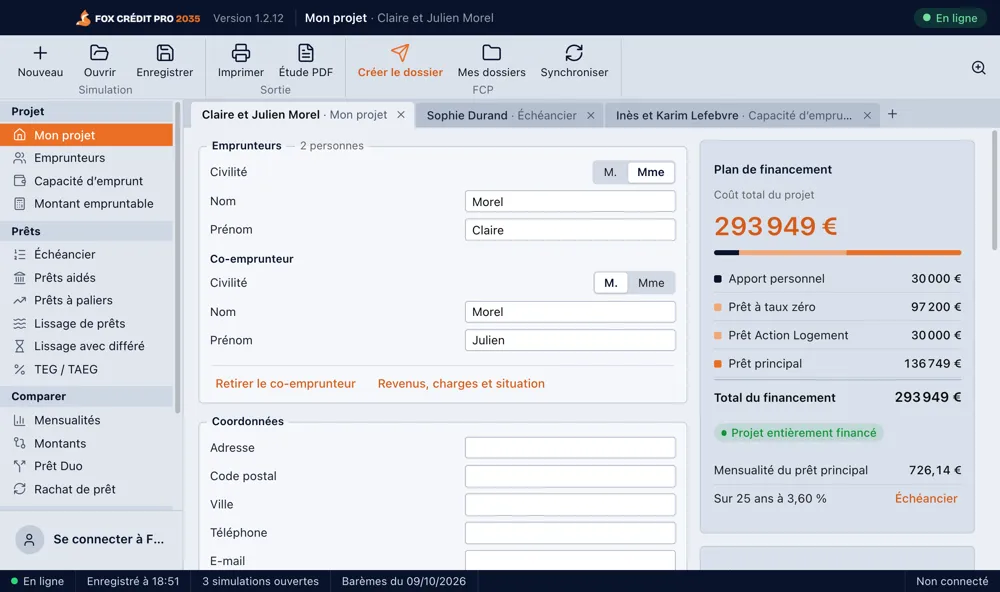
The advisor enters the client's project: property price, works, zone, borrowers, income, expenses. Notary and guarantee fees are computed while typing. Then every tool in the menu reuses that data, with nothing to type again:
- Project: My project (total cost, fees, financing plan), Borrowers, Borrowing capacity, Borrowable amount.
- Loans: Schedule, Assisted loans, Stepped loans, Loan smoothing, Smoothing with deferral, APR.
- Compare: Compare monthly payments, Compare amounts, Duo loan, Loan buyout.
- Financing study as a PDF: the advisor picks the sections, and the study comes out with the agency's letterhead.
- My simulations: each client has a tab, with the tool where it was left; open tabs come back when the software reopens.
- My files: the list of FCP files, with the same filters and columns as on the website.
- Help: the FCP assistant, available offline.
The heart of the project: exact calculations
In broker software, a one-cent gap on a monthly payment or a tenth of a point on an APR costs the trust of the advisor and the client. So the whole calculation engine is written in JavaScript inside the software, with a strict rule: every calculation has its official source and its test.
Schedule and APR
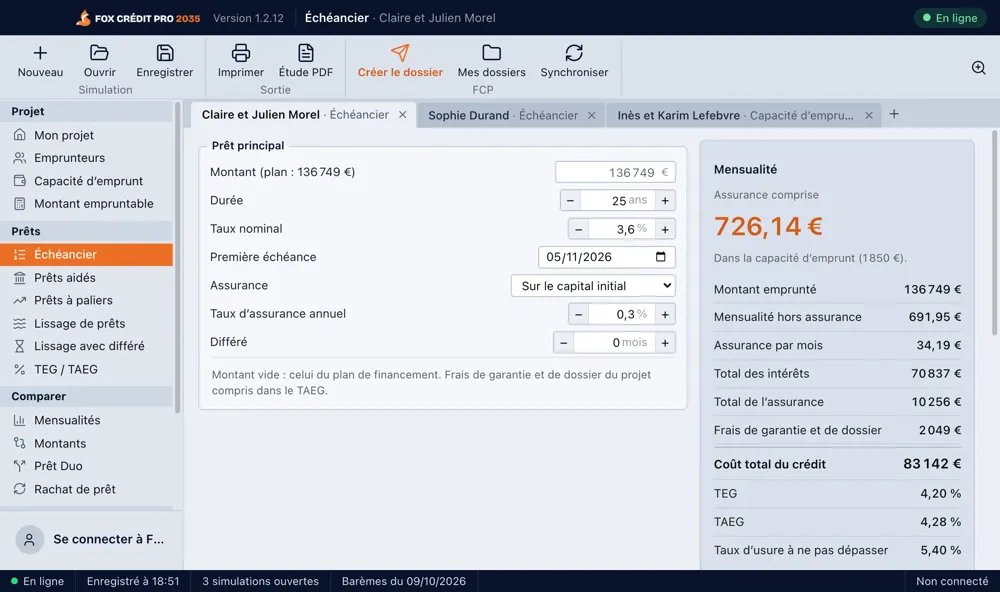
The schedule handles insurance on the initial capital or on the outstanding balance, partial or full deferral, and a last installment that settles the loan exactly. The APR follows the legal method of the French Consumer Code: the software looks for the rate that equates the capital received, net of fees, with the flows actually paid (installments, insurance, fees). That rate is found by bisection, a method that looks slow but always converges, where other methods can diverge on unusual setups. The APR is then compared with the current usury rate, and the debt ratio with the HCSF rules.
Notary fees and assisted loans
- Notary: fees by bracket under the Commercial Code, minimum and cap, overseas surcharges and VAT, transfer duties for each département with the reduced rate for a first main-residence purchase.
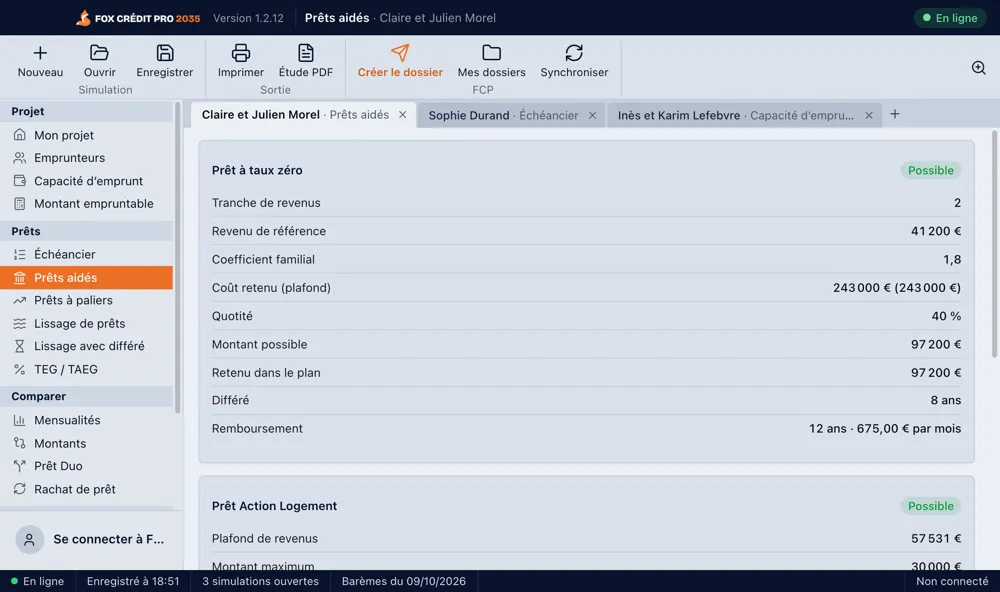
- Zero-rate loan (PTZ): scales for offers issued since 1 April 2025, by zone and income bracket. The rules are applied and explained: for existing homes, the PTZ only exists in zones B2 and C, with at least 25% of works; its amount is capped relative to the other loans of more than 2 years.
- Action Logement and social home-ownership loan: official caps and conditions, in the same financing plan.
Borrowing capacity and multi-loan setups
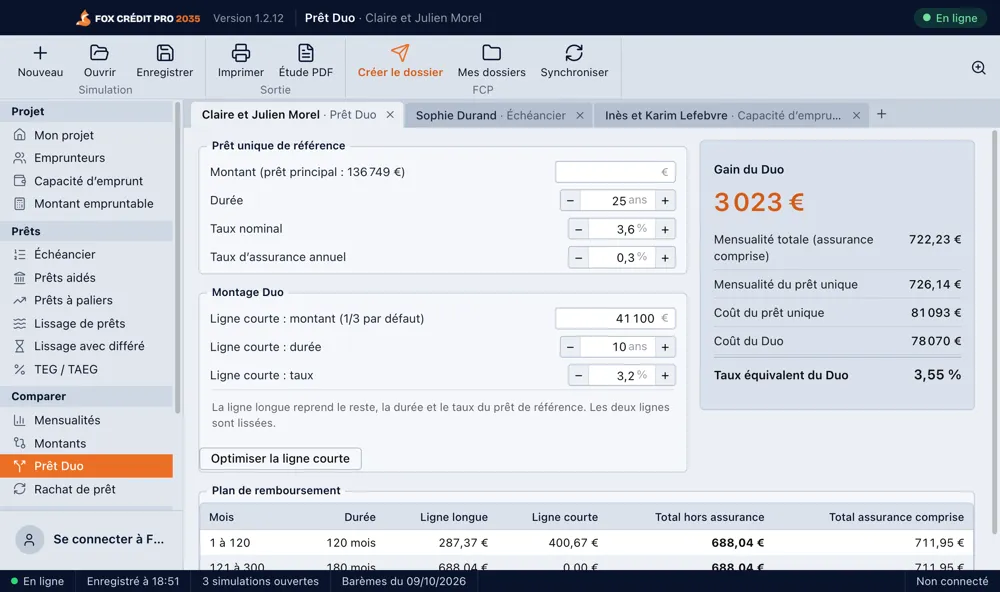
Borrowing capacity applies a 35% debt ratio including insurance, counts rental income at 70%, removes the current rent after buying a main residence, and shows the remaining income for the household and per person. Smoothing and the Duo loan look for a constant total monthly payment: instead of trial and error, as in the old simulator, the software computes it with a direct formula, with the same result to the cent. The loan buyout computes early repayment penalties under article R. 313-25 of the Consumer Code: the lower of six months of interest and 3% of the outstanding capital.
Proving the numbers are right
- Engine tests: payments, insurance, deferrals, notary, guarantees, PTZ, capacity, steps, smoothing, Duo, buyout, financing plan, usury and HCSF alerts.
- Parity tests: the schedule, APR and notary fees are compared with the back office's PHP code, which serves as the reference.
- Acceptance run in the real window: a script opens the software, fills every screen with the keyboard, clicks every button and compares every displayed figure with the engine; the latest version passes 185 checks out of 185.
- Dated scales: notary, PTZ, usury and guarantees live in a single versioned file, with their sources. The scales' date is shown in the status bar.
Offline first, synced afterwards
Advisors can copy FCP files to their computer, view them and edit them without internet. This is the trickiest part of the project, because two people can edit the same file at once: the advisor offline, and a colleague in the back office.
- Encrypted data: each record is encrypted (AES-256-GCM) and the key is protected by the system keychain (Keychain on Mac, DPAPI on Windows). Copied to another computer, the files are unreadable.
- Queue: each change waits for the connection to return, then goes out on its own. Each operation carries a unique token: FCP never applies it twice, even if it is sent again.
- Visible conflicts: if the same information also changed in FCP, nothing is silently overwritten. The software shows both versions and the advisor chooses.
- File created from a simulation: sent as soon as possible, only once, even if sent twice.
- Expired session detected: if FCP redirects to its login page, the software notices and asks to sign in again, instead of showing an obscure error.
- Connection state always visible: "Online" or "Offline" badge, number of pending changes, banner saying what works and what is waiting.
With internet, French addresses are suggested while typing through the IGN service, never making the input mandatory. Offline, input stays free. Help always works: it is the back office's knowledge base, embedded in the software, with a search engine that understands trade synonyms, without AI or internet.
Windows and Mac, like real desktop software
The software is built with Electron, which gives a single codebase for both systems. But Electron alone does not make desktop software: the "website in a window" feel had to go. There is no web view at all, not even for sign-in:
- Sign-in: a form in the software sends the credentials to each space's original form (immofinances.net, accord-credit.fr, brokerages). If refused, the message shown is the website's own, read from its response. Signing in through the browser is also possible.
- Interface: grouped toolbar, simulation tabs (Ctrl+S, Ctrl+Tab, Ctrl+W), in-window menu bar on Windows, status bar, zoom from 80 to 150%.
- Windows: standard installer for 64-bit PCs.
- Mac: a universal app, for Intel processors and Apple chips, signed with Developer ID and notarized by Apple, which automatic updates require.
Automatic updates that do not get forgotten
The software checks for updates at launch, then every 30 minutes, and downloads them in the background. A window then appears at the bottom right with a 30-second countdown and two buttons: "Install now" or "In 5 minutes". The delay can be repeated; with no answer, the update installs and the software restarts. Quitting the software also installs the ready version. That way, every advisor works with the same scales and the same calculations.
Tech stack
- Software: Electron, JavaScript (ES modules), interface without a framework.
- Calculations: JavaScript engine, dated official scales, tests with Node.js's test runner.
- Sync: JSON API added to the FCP back office in PHP, operation queue with unique tokens.
- Local storage: AES-256-GCM encrypted files, key protected by the system.
- Distribution: electron-builder, electron-updater, Apple signing and notarization.
What this project shows
FOX CRÉDIT PRO 2035 combines regulated financial calculations where errors are not an option, offline operation with a sync that neither loses nor overwrites anything, and careful distribution on two systems. I led the project alone from end to end: design, development of the Windows and Mac software, calculation engine, sync with the FCP back office, automatic updates, presentation film and download page.
Do you have business software to build or modernize, with calculations to make reliable or an offline mode? Get in touch. To see the other screens, see all screenshots.
Frequently asked questions
Does the software really work without internet?
Yes: all calculations run on the computer. Internet is only used to fetch FCP files, send changes, suggest addresses and receive updates.
What happens if a file was changed elsewhere while I was offline?
Nothing is overwritten. If the same information changed in FCP, the software shows both versions and you choose which one to keep.
Can you build offline business software for my company?
Yes. FOX CRÉDIT PRO 2035 brings together the building blocks of such a project: tested calculations, encrypted data on the computer, sync with an existing server, Windows and Mac, automatic updates. Let's talk about your needs through the contact page.


