

Contents
Key takeaways
- The register works fully without Internet, on a transactional local SQLite database.
- Payments split between cash, Orange Money, Wave, Moov Money and MTN MoMo, in whole FCFA.
- Automatic sync with the server, with no duplicates and no key to enter.
- Direct ESC/POS thermal printing with fallback to the Windows driver, kitchen tickets per station.
- Automatic updates that never interrupt an open session.
Tuego is point-of-sale software for restaurants and shops, designed first for Côte d'Ivoire: whole prices in FCFA, payments split between cash and mobile money, tables and waiters, composed dishes, kitchen tickets. The Windows app works fully without Internet, syncs on its own with the server and updates itself automatically.
A register that never stops
In a restaurant, the register is the most used tool of the day. It has to respond fast, charge without errors and keep running when the Internet goes down, which happens. Local needs matter too: in Côte d'Ivoire, one ticket is often paid partly in cash and partly with Orange Money or Wave, and amounts have no cents.
Tuego meets these constraints. It serves restaurants (tables, waiters, kitchen) as well as counter shops, such as a hardware store or a boutique, thanks to a shop mode that removes tables and "dine in / takeaway". The register has an administrator and cashiers, each with a 4-digit code to log in quickly, without a keyboard.
The life of an order
- Open a table: pick its number and waiter, or open a takeaway order.
- Take the order: a click on a simple product adds it; a composed product opens its choices (size, meats, sauces) with an updated total.
- Send to preparation: one ticket goes to each station, kitchen or counter, with the dishes not yet sent.
- Charge: pay the ticket with one or several payment methods, compute change, print the receipt.
- Close the day: at the end-of-service time, the day closes on its own and the figures are ready.
Main features
Sales and dining room
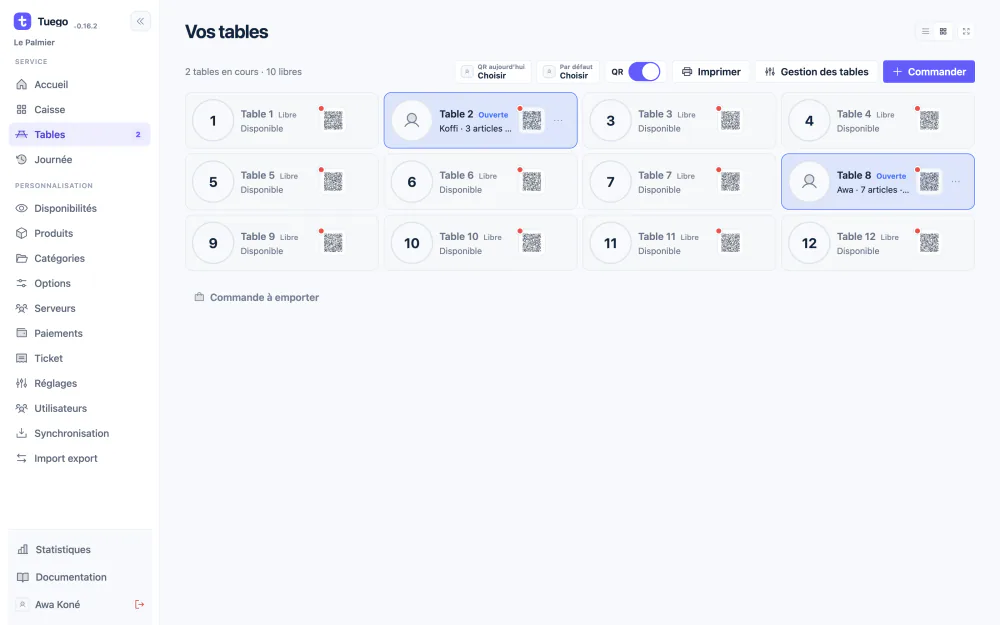
- Tables numbered automatically, renumberable, can be disabled; each table keeps its cart, even after a restart.
- Waiters named on each ticket, distinct from the cashier who charges.
- Merging two tables, and takeaway orders in a separate cart.
- QR code ordering at the table: customers browse the menu on their phone and order; payment happens at the restaurant.
Catalog
- Ordered categories, products with photo or icon, price, VAT and open price.
- Reusable option groups (meats, sauces, sizes, colors) with minimum, maximum and extras in FCFA.
- Repeatable choice (double chicken), optional groups, identical compositions grouped by quantity.
- List or card display, selection and bulk actions, catalog import and export.
Payments
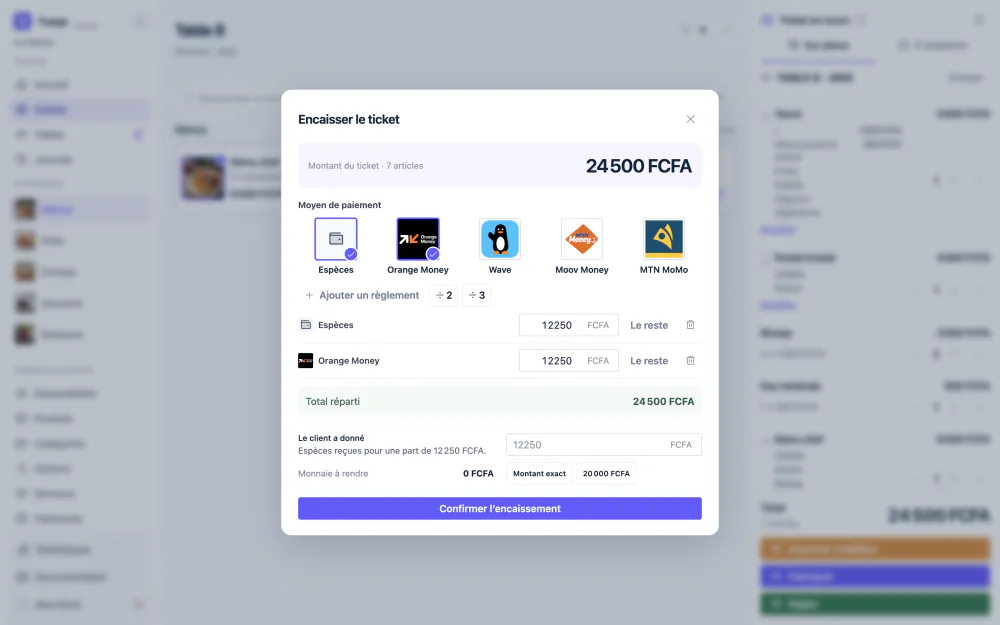
- Five default methods: cash, Orange Money, Wave, Moov Money and MTN MoMo, which can be renamed, reordered and disabled.
- Payment split across several methods, "Split by 2 / 3" and a "Remainder" button.
- Change calculated from the bills actually received.
Reporting
- Daily dashboard: revenue, orders, average ticket, 14-day trend, best sellers.
- Statistics by day or period, peak hour, comparison with the previous period.
- Today's tickets filterable by payment method and waiter, closed days available, PDF and CSV export.
The technical challenges, and how they were solved
Charging without Internet, without ever losing a sale
The register works on a local SQLite database. Writes are transactional, with a WAL journal and full disk sync, so a power cut does not leave a half-saved sale. Each validated ticket keeps a frozen copy of names and prices: editing or removing a product later does not change old tickets. The current cart is kept so work can resume after a restart.
Each payment request carries a unique ID. If the operation fails or is repeated, the same request can be replayed without creating a duplicate.
Synchronization that catches up on its own
The restaurant owner has no server address or key to enter: once the shop is configured, the register enrolls itself on the server as soon as the Internet is available. Changes leave from a transactional queue, in order. A send only leaves the queue once its ID and SHA-256 hash are confirmed. A lost response is replayed without doubling sales, and earlier days still pending are sent too.
Split payments without cents
The CFA franc has no cents: every amount is a whole number. Splitting 1,001 FCFA in two gives 500 and 501, the last share absorbing the remainder. Each payment method is either "cash", which allows change, or external, paid at the exact amount. Example: a 20,000 total, paid 10,000 with Orange Money and 10,000 in cash with a 15,000 bill received, gives 5,000 in change. The database refuses any split that is incomplete, excessive, fractional or uses a disabled method. Tuego never debits an account: the cashier confirms the mobile payment after checking it.
Composed dishes
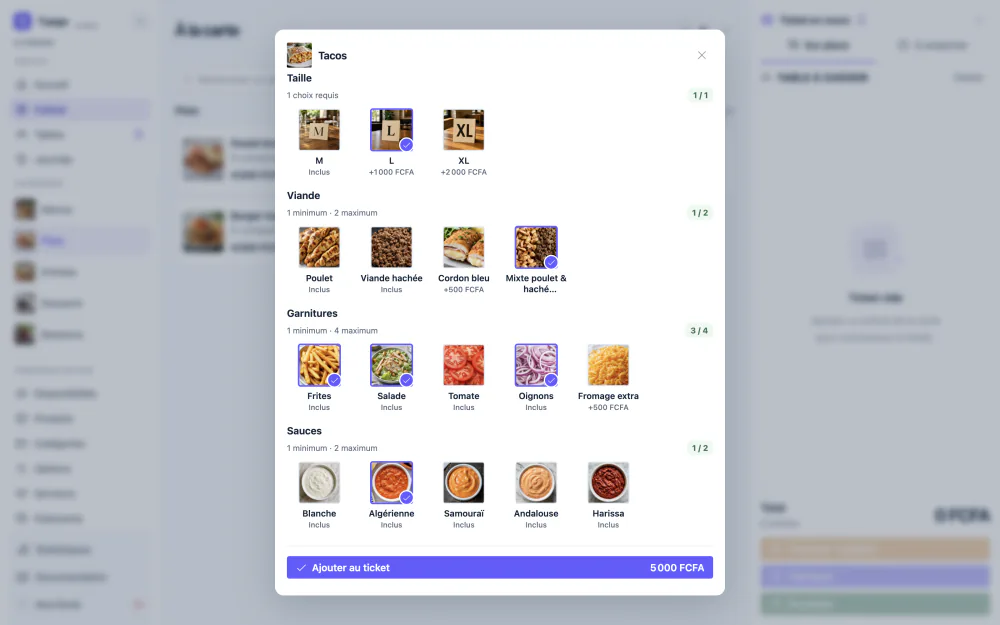
A tacos is ordered with a size, one or two meats, toppings and sauces, each with its own rules. Option groups are reusable across products, with a minimum and maximum per product. Mandatory rules must be met before the item is added to the ticket. The app's main process recalculates amounts and refuses any unknown, unavailable or out-of-range choice, even if the interface was bypassed. Choices and extras appear on the receipt, the PDF, the printout and the CSV export.
Thermal printing
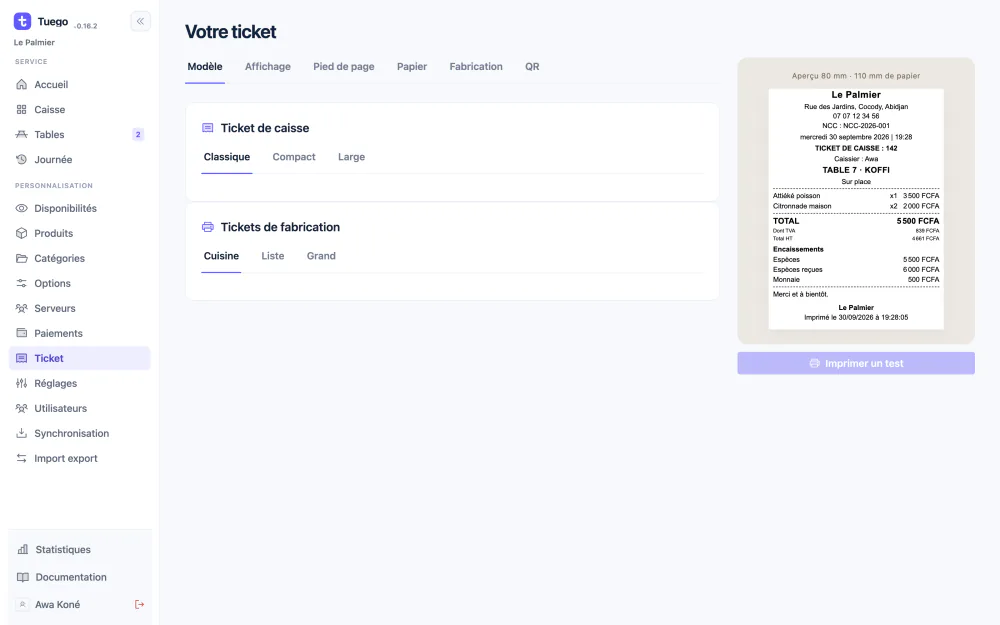
Receipt printers are many and uneven. Tuego offers two modes. Windows mode goes through the printer driver, like any document. Direct mode sends a raw ESC/POS stream with the rasterized ticket to the Windows spooler, for 58 and 80 mm thermal printers, and triggers the paper cut. If the printer refuses this stream, Tuego falls back to Windows mode and says so. Receipt and kitchen ticket templates are designed with a live 80 mm preview.
A business day that does not end at midnight
Restaurants often close after midnight. Tuego's day therefore changes at the end-of-service time, 4 a.m. by default in Abidjan time, and each day starts again from ticket 1. Automatic closing is checked every minute; if the PC was off, it is done at the next launch. Tables still open at that point are carried over as they are to the new day. Manual closing, on the other hand, requires all orders to be finished.
QR code ordering at the table
Each table has its QR code. Customers open the restaurant's menu on pay.tuego.fr, build their order and confirm it; it reaches the register and goes to preparation. To avoid ghost orders, the register regularly signals that it is active: with no signal for ten minutes, or once the day is closed, online ordering is suspended with a clear message. The number of orders is limited per address and per table, and the customer pays at the restaurant.
Updates that never interrupt service
The restaurant installs Tuego only once. New versions are downloaded and verified (SHA-512) in the background. An open session is never interrupted: automatic installation waits for a login screen that has been idle for two minutes and an empty cart, and it holds off during printing, day closing or sync. Before each database change, a backup copy is made and the migration runs in a single transaction. A database from a newer version is refused. Publishing a version ends with a real test download, just as a register would do.
Tech stack
- Register: Electron, React, TypeScript, Tailwind CSS and SQLite. The interface runs in an isolated, sandboxed context with no network access; only the main process touches the database.
- Server: PHP and MySQL, with rate limits and security headers.
- Table ordering: a lightweight web page served by the same server.
- Distribution: French NSIS Windows installer and a private update channel.
- Tests: unit tests for calculations and rules, end-to-end tests with Playwright, server integration test on MariaDB.
What this project shows
Tuego was designed and built end to end by Ahmed Sanoko: Electron register, PHP and MySQL server, QR code ordering, publishing and deployment. It brings together what a register demands: speed at the counter, exact amounts, offline operation, varied printing hardware and updates without interruption, all adapted to local payment habits.
Do you have a point-of-sale, sales software or app project that must hold up without Internet? Get in touch. You can also see all the screenshots of Tuego.
Frequently asked questions
Does the register work if the Internet is down?
Yes. Tuego charges, prints and closes days without Internet. Operations stay in the local database and are sent to the server when the connection returns.
Does Tuego collect mobile money payments directly?
No. Tuego records the split between cash and mobile money; the cashier checks the payment on their phone or terminal, then confirms it. The software never debits an account.
Which printers are supported?
Any printer installed with its Windows driver, plus a direct ESC/POS mode for 58 and 80 mm thermal printers with paper cut. A test page lets you check each printer.


