

Contents
Key takeaways
- One iOS and Android app for two roles: parents and nannies, each with its own journey.
- Search by map or list, with distance and age filters, and pagination by 20.
- Nanny checks: ID document and criminal record reviewed from the back office.
- 4-step booking and real-time messaging that carries the whole booking life cycle.
- Stripe and Apple Pay payment, secret key on the server and PDF invoice sent by email.
Magic Nona is a mobile app that connects families with retired nannies for occasional or regular childcare. I handled the whole build: the iOS and Android app, the small PHP API that runs payments and emails, and the admin back office. Here is what the product does, and above all what it took to make it work well.
The product: trusting your kids to an experienced nanny
The idea behind Magic Nona is simple: retired people with long childcare experience offer their services, and parents find them near home. That means two audiences in the same app, with two very different journeys.
- Parents look for a nanny, view her profile, send a childcare request, chat with her and pay in the app.
- Nannies fill in a complete profile, set their hourly rate, publish their availability, upload their documents, accept or decline requests and get paid without handling cash.
On launch, the app reads the user's profile and picks the right navigation: a parent area or a nanny area. The same code serves both roles, but the screens, checks and available actions change.
Finding a nanny: map, list and filters
The home screen has two modes, switched with one tap: a list of nannies with the map on top, or a full-screen map. Each nanny shows up with her photo, age and hourly rate.
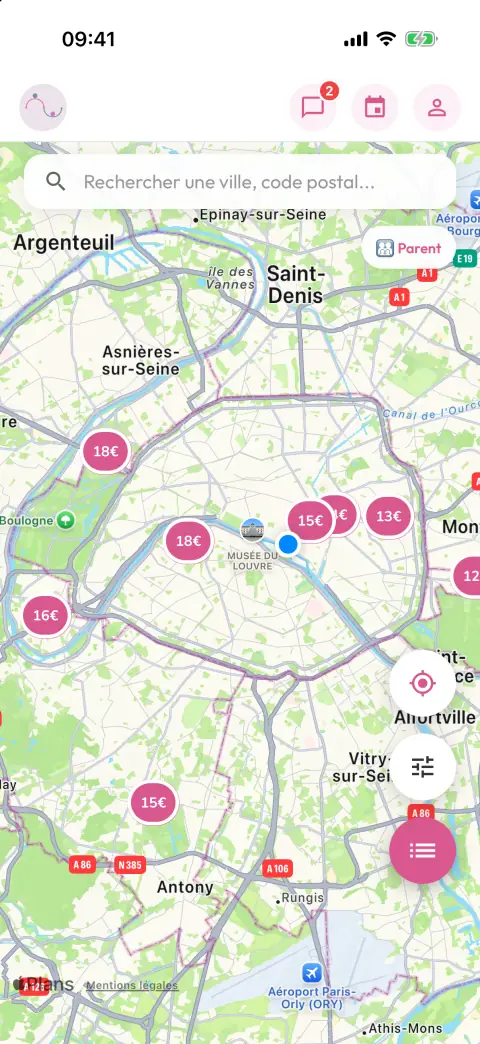
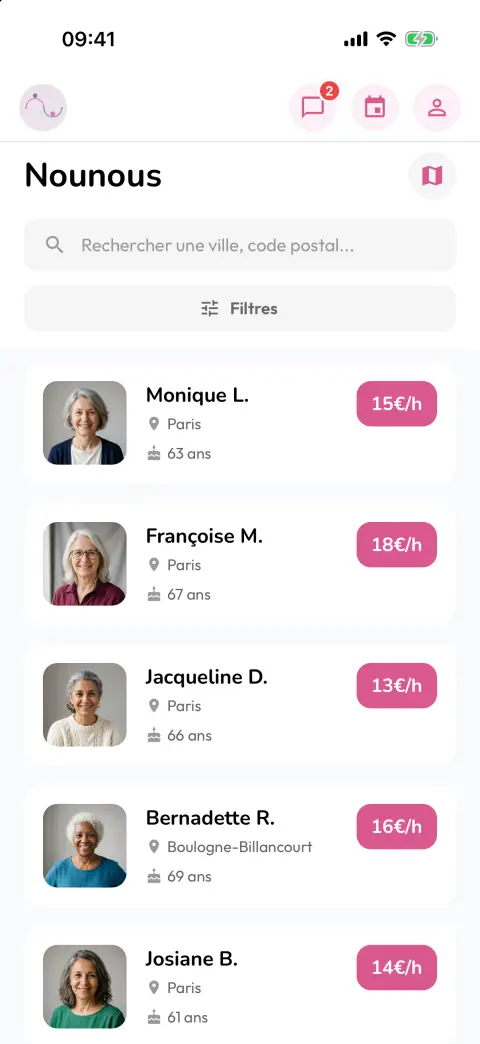
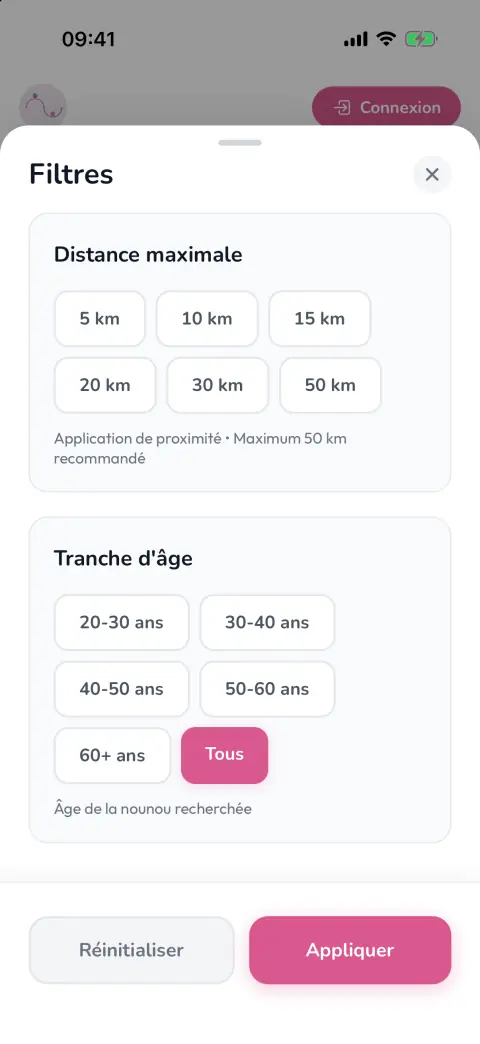
- Search by city or postcode, with a field that filters results as you type.
- Distance filter (from 5 to 50 km) based on the parent's location.
- Filter by the nanny's age range.
- Pages of 20 with infinite scroll: the list grows as you reach the bottom.
- In map mode, only nannies inside the visible area are shown, which keeps the map readable as you zoom or move.
A nanny only appears in results once her profile is complete. The app enforces it at sign-in: name, date of birth, bio and rate, then full address, phone number and photo. As long as something is missing, she is sent to the right screen with a message explaining what to fill in. Once everything is there, her profile becomes visible.
Trust: identity check and criminal record
For a childcare service, trust comes first. The app asks nannies to upload an identity document (ID card, passport, driving licence or residence permit, front and back) and a criminal record extract.
- Photo taken with the camera, picked from the gallery or uploaded as a file.
- Images compressed on the phone before upload, for fast transfers even on an average connection.
- Files stored in Firebase Storage, profile set back to "not verified" on every new upload.
- Automatic email to the administrator saying there are documents to review.
- "Verified" badge shown on the public profile once approved from the back office.
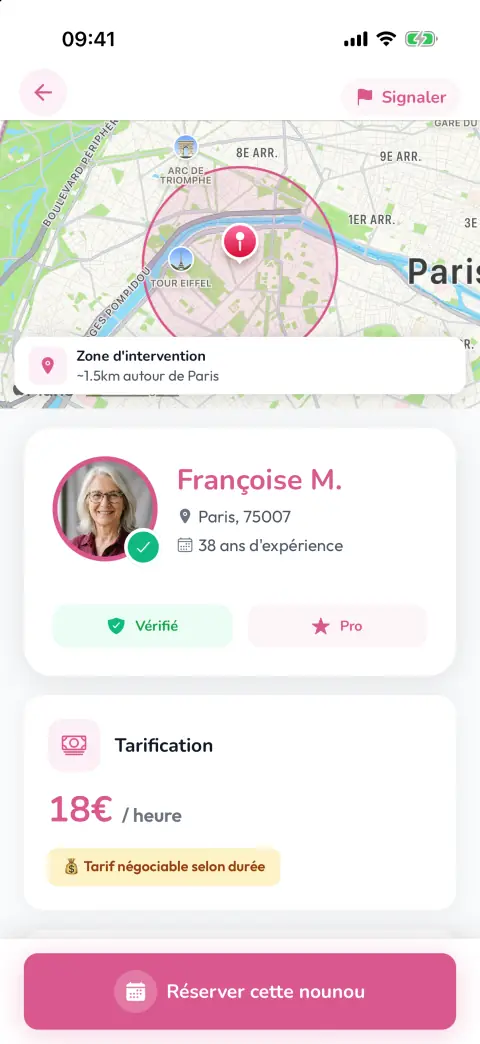
Booking in four steps
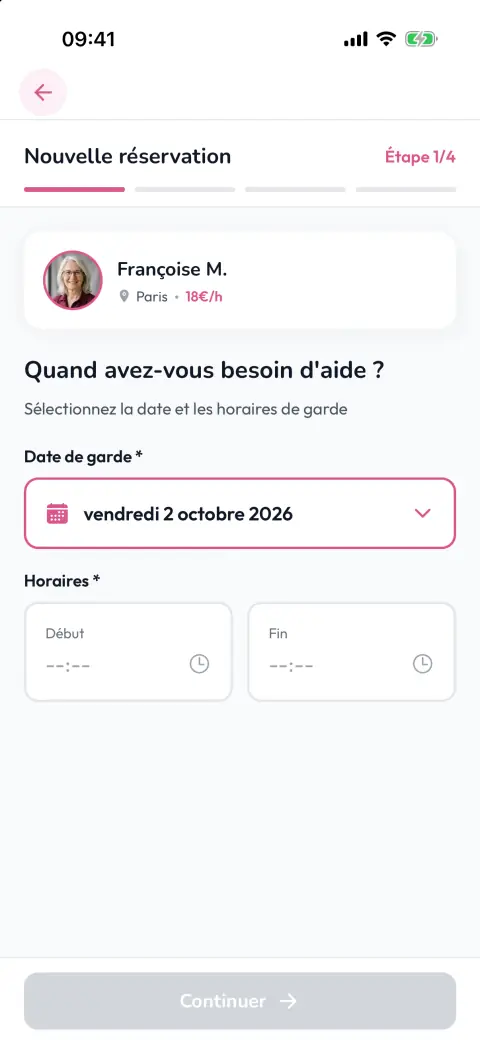
From the profile, the parent starts a childcare request. The form is split into four steps with a progress bar, and the "next" button only unlocks when the step is valid.
- Date and hours. The calendar only opens the days when the nanny is available, and only slots inside her time ranges are offered. The duration is calculated automatically.
- The children. Number of children and the age range of each one.
- The details. Special instructions and whether there are pets at home.
- Price and contact. The app suggests a price based on the number of hours and the nanny's rate, increased for each extra child. The parent can offer their own amount.
When sent, the request is saved and the nanny gets a push notification. On her side, she manages her availability day by day, with one or more time ranges, and finds all her bookings in a filterable calendar.
Messaging, the heart of the transaction
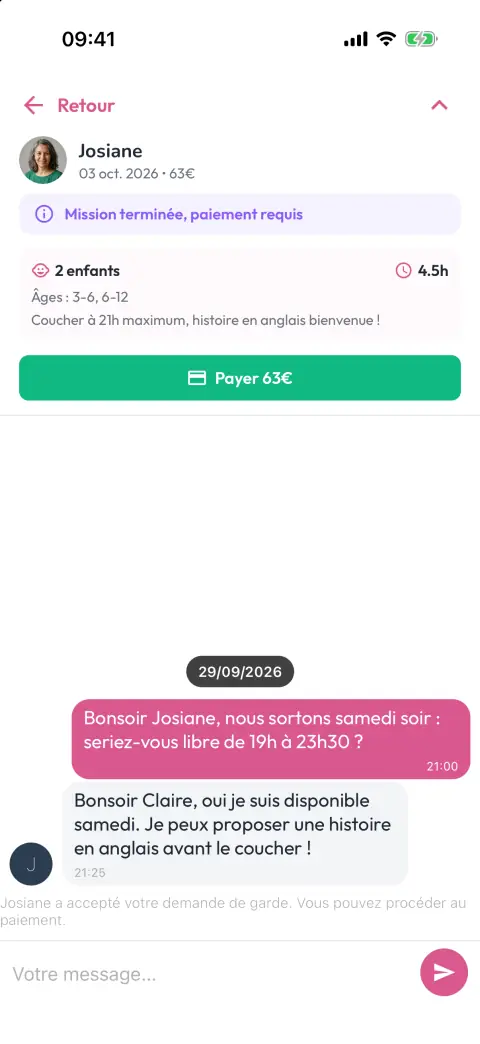
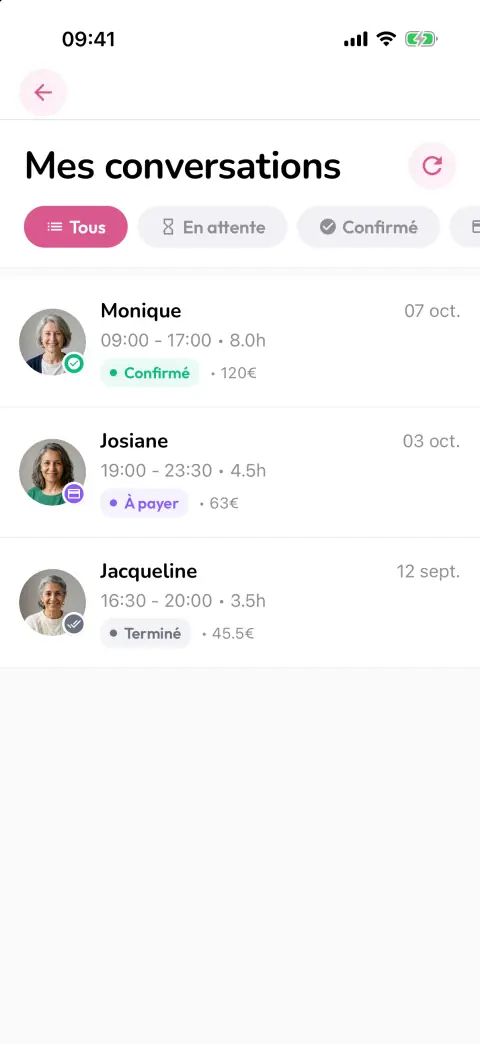
Each request opens a real-time chat between the parent and the nanny. But it is not just a chat: it carries the whole life cycle of the booking, with a status shown at the top of the screen.
- Pending: the nanny can accept, decline or change the proposed price.
- Confirmed: each person's contact details become visible, and only then.
- Awaiting payment: the nanny marks the job as done, the parent is asked to pay.
- Paid or cancelled: the chat keeps a record of everything.
Every action (acceptance, refusal, new price, job done) writes a system message in the chat and sends a push notification to the other person. Notifications are also stored in the database, so they can be found in the app even if missed on the lock screen. The home screen shows the number of pending actions, updated live.
Payment: Stripe, Apple Pay and PDF invoice
Payment happens only in the app, with no cash. This is the part where there is no room for approximation.
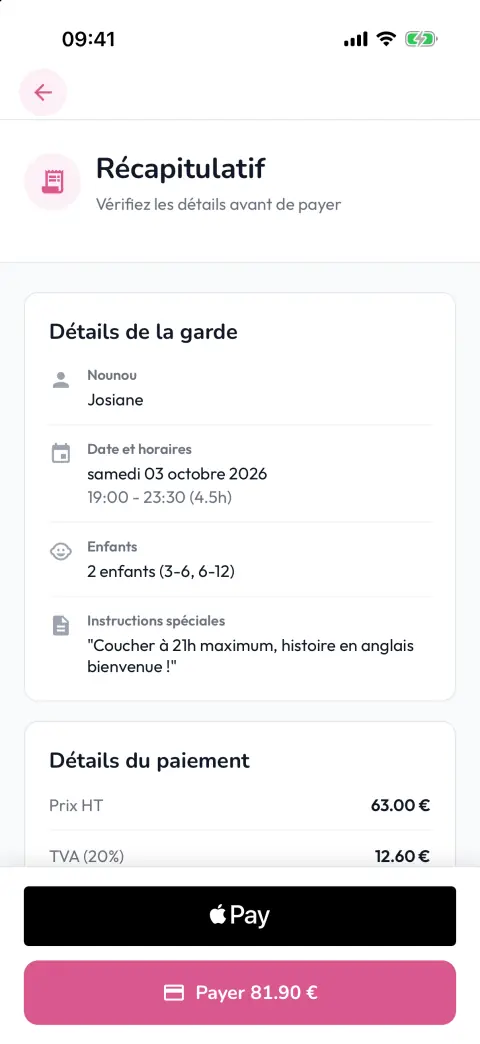
- Secret key on the server. The app never contains the Stripe secret key. It asks the PHP API to create the payment intent, receives only a temporary identifier, then opens Stripe's native payment sheet.
- Apple Pay is offered when the device supports it, with the line items shown in the payment sheet.
- Adjustable VAT and commission. Rates are not hard-coded: they are read from a configuration editable in the back office. The summary breaks down the booking price, VAT and service fee.
- After payment, the booking switches to paid, then the API generates a PDF invoice and emails it to the parent. The nanny and the administrator also receive a confirmation email.
Technical challenges and how they were solved
Two roles, one app
Parents and nannies have neither the same screens nor the same obligations. Navigation is chosen at launch based on the role, and a check runs every time the user returns to the home screen: blocked account, unverified email, incomplete profile. Each case leads to the right screen, so a half-filled profile never goes public.
A map that stays smooth
Nanny addresses are converted into coordinates to place them on the map, then the distance to the parent is calculated on the phone. To avoid loading everything at once, the list is paginated by 20 and markers are not redrawn on every move. In map mode, only nannies in the visible area are displayed.
One consistent status for two people
The parent and the nanny look at the same booking from two phones. Screens listen to changes in real time: when the nanny accepts, the parent sees the new status immediately, with the system message and the notification. Contact details are only revealed once the booking is confirmed.
Sensitive documents
ID documents and criminal records are compressed before upload, stored separately, and any change puts the profile back into review. The check stays human, from the back office.
Five languages and two stores
The app is translated into French, English, German, Spanish and Italian, and remembers the user's choice. It is built with Expo and EAS for iOS and Android from a single codebase.
The back office and the tech stack
A React web back office lets the team run the service:
- user list and detailed user page, with account activation or blocking and approval of checks;
- review of the documents uploaded by nannies;
- tracking of bookings and their details, and a view of availabilities;
- sending push notifications to users;
- VAT and commission settings, with a sample calculation.
On the user side, there is also problem reporting, a contact form, bank details (IBAN) for nannies and account deletion from inside the app, followed by a confirmation email.
The tech stack
- App: React Native with Expo, NativeWind, React Navigation, i18next, react-native-maps, Gifted Chat, Expo Notifications.
- Data: Firebase Authentication, Firestore (real time) and Storage.
- API: PHP with Stripe, PHPMailer and mPDF for invoices.
- Payment: Stripe, native payment sheet and Apple Pay.
- Back office: React.
- Release: EAS Build, App Store and Google Play.
Magic Nona shows a project delivered end to end: mobile app design, business logic between two types of users, secure payment, back office and release on both stores.
A similar project? Do you have an idea for a matching platform, with booking, messaging and in-app payment? Get in touch to talk about it. You can also see all the screenshots of Magic Nona.
Frequently asked questions
Can you build an app with two types of users, such as clients and providers?
Yes. Magic Nona serves parents and nannies in a single iOS and Android app: navigation, screens and checks adapt to each user's role.
How is payment secured in the app?
Payment goes through Stripe. The secret key stays on the server: the app asks the API to create the payment, then opens Stripe's native payment sheet, with Apple Pay when the device supports it.
Can providers be checked before they become visible?
Yes. In Magic Nona, nannies upload an ID document and a criminal record from the app, the administrator is notified by email and approves the profile from the back office, which shows a "verified" badge.


