

Contents
Key takeaways
- Three parts linked to one server: customer app, AA Caisse till (phone, tablet, PC) and Restaurant panel.
- The till rings for every order even with the app closed or the screen locked, using the chosen ringtone.
- Live order tracking and customer notifications at every step.
- The server rechecks every order under a lock: price, availability, promotions, points, no duplicates.
- Automatic ticket printing and remote updates without going through the stores.
AA Foods lets a restaurant's customers order from their phone, and lets the restaurant receive, prepare and deliver those orders without missing any. The project has three parts talking to the same server: the customer app for iPhone, iPad and Android, the AA Caisse till app for phone, tablet and Windows PC, and a Restaurant panel inside the AA Foods Gestion software. I designed and built all of it on my own, from the server to the screens.
Who it is for, and what it does
The project is built for restaurants in Côte d'Ivoire: prices in FCFA, Abidjan time, payment on delivery or at pickup, in cash or mobile money. The customer picks a restaurant, builds an order and follows it until it is handed to the driver. At the restaurant, the till phone rings for every order. Management runs everything from a computer: menu, promotions, storefront, tills, customers and statistics.
The goal was easy to state and hard to deliver: a customer app as pleasant as those of the big delivery platforms, and a till that never leaves an order unanswered.
The customer journey
- Pick a restaurant. The home screen shows the delivery address, search, promotions that scroll on their own and restaurants as photo cards, with their status (open, closed, paused).
- Build the order. The menu is organised by section. Each dish can have options: size, required side, choice of sauces, paid extras, with a minimum and maximum number of choices.
- Place the order. Delivery or takeaway, address, landmark, optional location, promo code, loyalty points. The account (phone number and 4-digit code) is only requested at that point: menus can be browsed without one.
- Track it live. Sent, accepted and in the kitchen, ready, handed to the driver, with the time of each step. Tracking refreshes every 8 seconds, and a notification tells the customer when the order is accepted, ready or declined (with the reason).
- Leave a review. Some time after hand-off, a review page opens just once: one question at a time, then an optional comment.
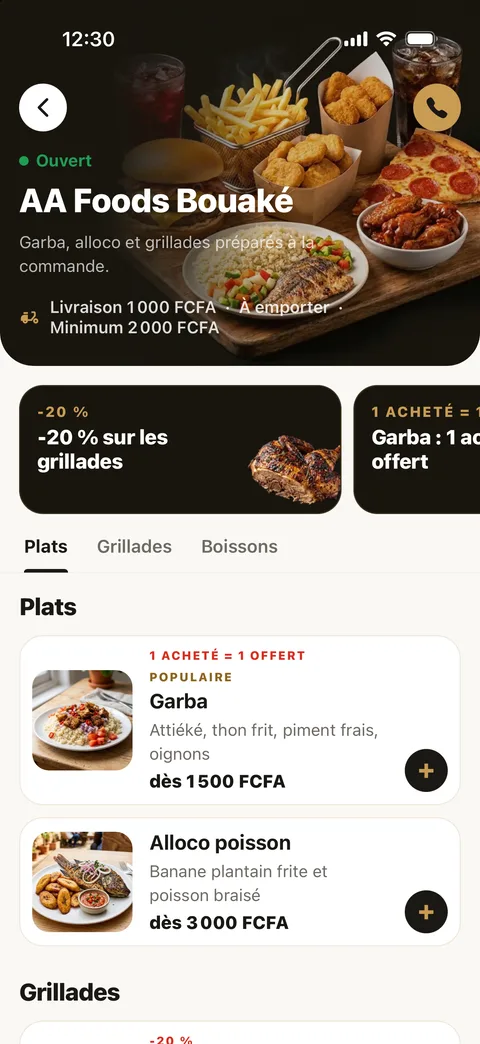
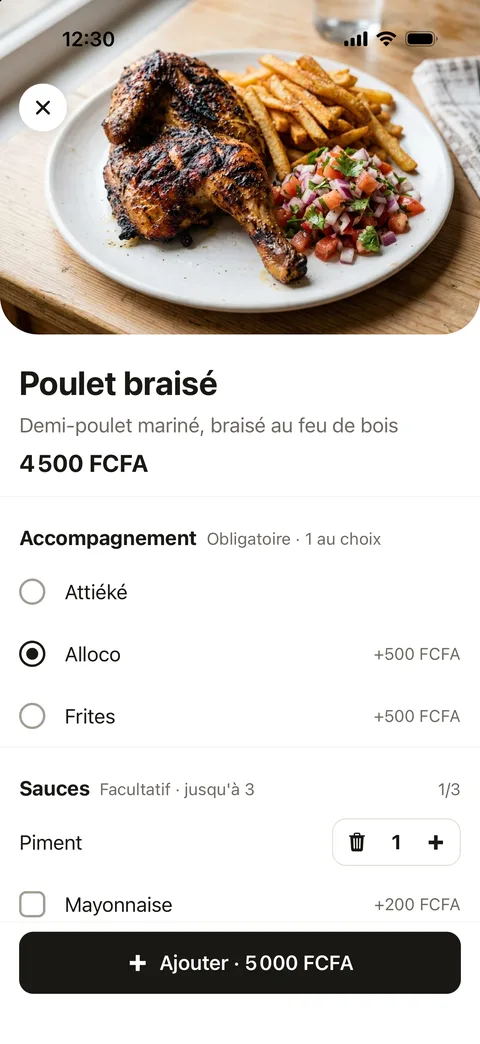
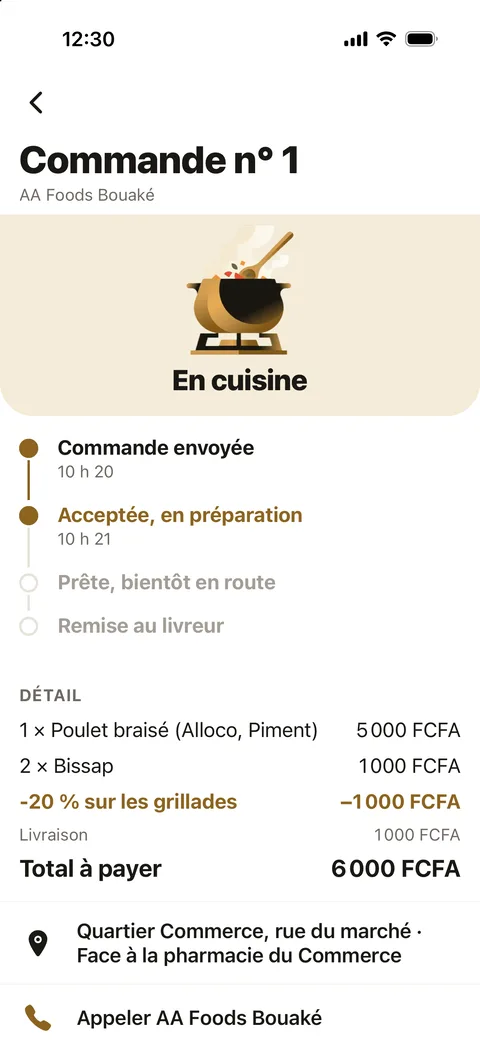
What the customer app does
- Search that ignores accents and capitals across dishes, restaurants and promotions, with recent searches and popular dishes drawn from the real menus.
- An animated search bar that types "Craving…" followed by a dish that really is on the menu.
- Sold-out items shown greyed out and impossible to order: menus refresh every 30 seconds without restarting the app.
- A wide range of promotions: percentage, fixed amount, special price, "buy X get Y free", free delivery, first order only or not, with or without a code.
- A points wallet (1 point = 1 FCFA) shared across all restaurants: "Pay with my points", the rest is paid on delivery.
- "My orders" history with the status of each order.
- A dedicated iPad version: sidebar with navigation, city, cart and current order; two-column tracking.
- Headers that stretch when you pull the page, animated natively; Plus Jakarta Sans typeface; reduced motion respected.
- Account deletion from the app: orders are anonymised.
AA Caisse: the order that rings, even with the app closed
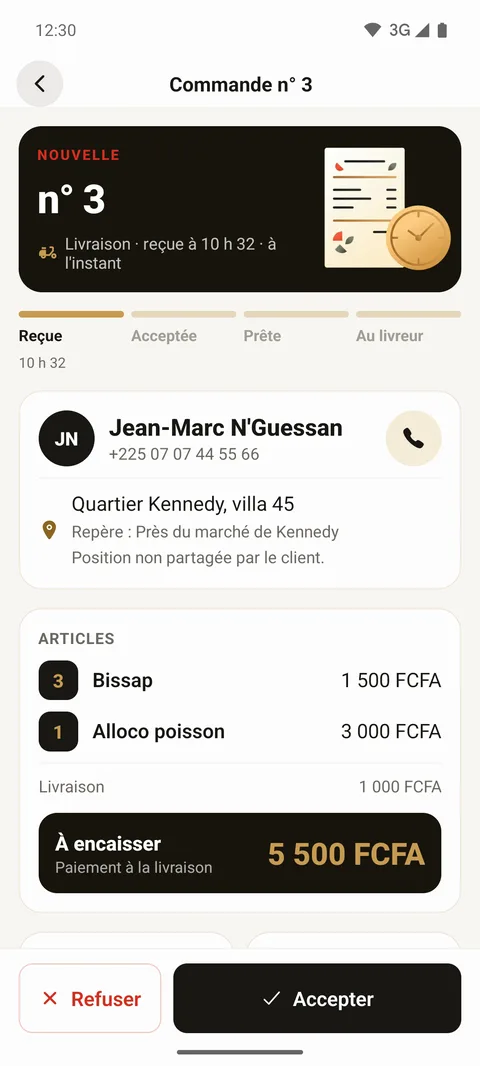
An order left unanswered is a lost customer. So the till was built around one rule: the phone must ring, even when the app is in the background or the screen is locked.
- Push notifications. For every new order, the server alerts all of the restaurant's active till phones, through Firebase Cloud Messaging, sent directly from the server with no paid middleman. Customers get their tracking notifications the same way, through Firebase on Android and Apple's service on iPhone.
- Dedicated Android channel. Maximum priority, visible on the lock screen, vibration, and allowed through "Do not disturb".
- Choice of ringtone. Six sounds, including a voice announcement of the order. On Android, a channel's sound cannot change once created, so there is one channel per ringtone, and the server sends each order on the channel chosen by each phone.
- Looping until someone answers. With the app open, the ringtone keeps going until a cashier responds, and the screen never goes to sleep.
- Opening alarm. Scheduled on the phone itself, it rings at opening time with the app closed and even without Internet. Nothing ever opens on its own: the cashier taps "Open" or schedules the opening.
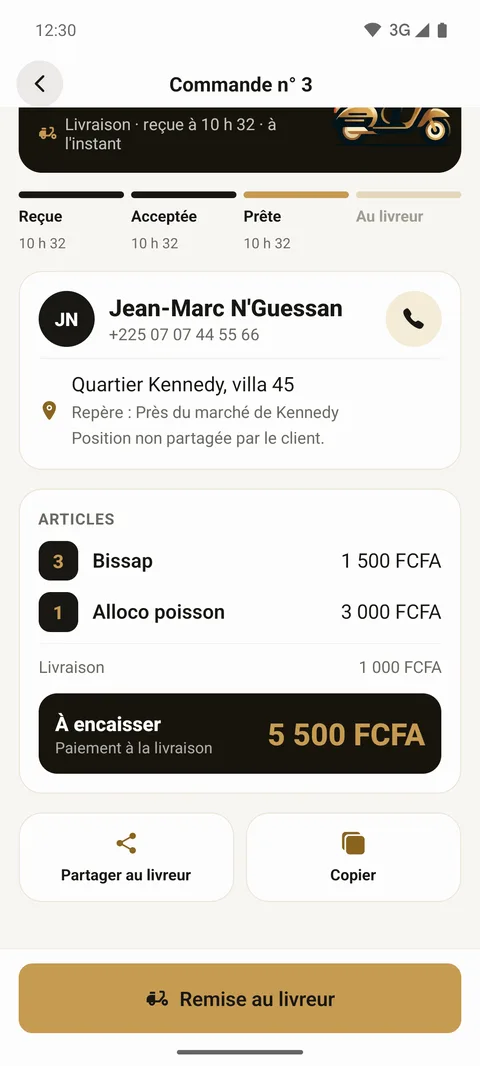
The cashier accepts the order or declines it with a reason the customer sees in their app. They mark it ready to notify the customer, then pass it to the driver via WhatsApp, SMS or copied text, with a Google Maps link if the customer shared their location. From the till's menu, an item can be marked sold out or hidden in one tap, and orders can be paused with a message to customers.
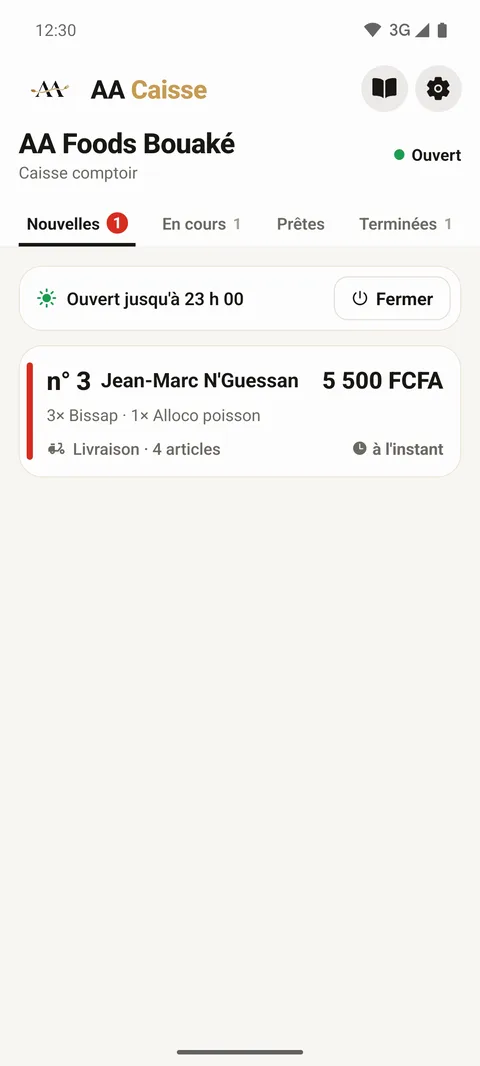
Ticket printing and the PC till
The till prints the ticket automatically on acceptance (or on arrival, as preferred), once per order and per device, with an optional kitchen ticket without prices. Settings go deep: 58 or 80 mm paper, ESC/POS or Star compatibility, cut, ticket template, displayed items, margins, preview and test print. Any order can be reprinted from the history, one day at a time, up to a year back.
On Android phones, printing goes through a Bluetooth or network printer via a native module written in Kotlin. On PC, AA Caisse for Windows runs exactly the same code as the mobile app: only a few PC-specific files differ (Windows printing, Windows notification, window brought to the front for every order, start with Windows, automatic updates at a quiet moment).
The Restaurant panel to run it all
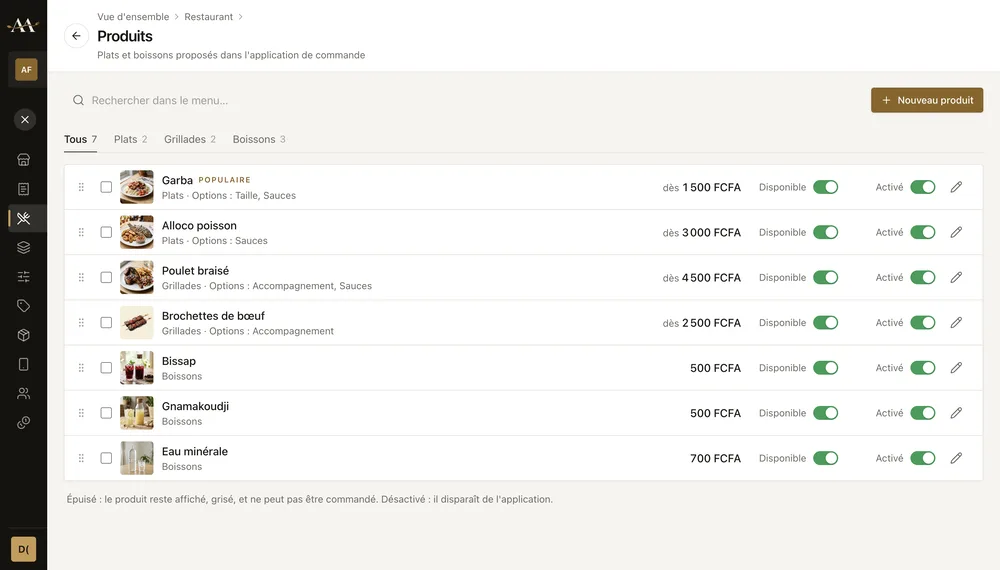
In the AA Foods Gestion software, the Restaurant tab brings together everything management handles:
- today's and past orders, amount, pending orders and customers online;
- products, categories and option groups with their extras;
- promotions and promo codes;
- each location's storefront: photos, description, opening hours, delivery, takeaway, fees, minimum order, pause;
- paired tills, customers, loyalty points, reviews and media;
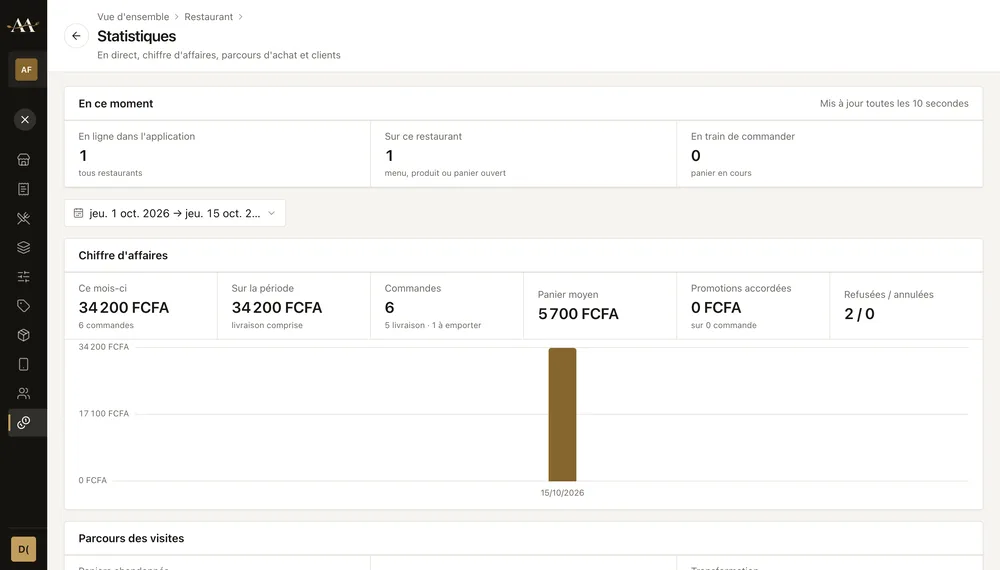
- built-in statistics: live view, revenue, menu → cart → order funnel, abandoned carts, new, loyal or lost customers, items sold and viewed.
The menu can be edited even without Internet: it goes to the server at the next sync.
The technical challenges, and how they were solved
The server always has the final say
Between filling the cart and confirming, an item may be switched off or a price may change. So the server rechecks everything in a single locked transaction: restaurant open, mode offered, item active and available, composition, displayed price. If an item has just been switched off, nothing is saved: the app fixes the cart and explains why. An order resent after a network drop or a double tap is only recorded once.
Watertight promotions
The promotion logic exists twice, identically: in PHP on the server and in TypeScript in the app, so the right total shows immediately. Both are checked against the same test cases. The rules prevent abusive stacking: one promotion per item unit, only one on the order, a discount never above the subtotal. The server always recalculates at order time, with up-to-date usage counters.
Simultaneous actions
The customer can cancel until the order is accepted. If cancellation and acceptance arrive at the same time, only one goes through. Points payments are deducted under a lock and refunded automatically, exactly once, if the order is declined or cancelled.
Pairing a till remotely
The software shows an 8-digit code, valid for 15 minutes and usable once, which the cashier types into AA Caisse. The server links them: the computer can be far from the restaurant. After 10 wrong codes from the same connection, pairing is blocked for an hour.
Updates without going through the stores
Both apps receive fixes remotely: the code is published signed, and the app downloads and offers it. The publishing script refuses to send if a native element has changed, since that would require a full new version of the app.
Tech stack and know-how
- Mobile apps: React Native and Expo (Expo Router, expo-notifications, expo-updates), TypeScript.
- Android printing: custom native module in Kotlin (Bluetooth and network).
- PC till and management software: Electron, React, TypeScript.
- Server: PHP API and MySQL, Firebase Cloud Messaging and Apple Push Notification service notifications sent directly.
AA Foods covers the whole chain of an online ordering service: a polished customer app, a reliable till on three kinds of devices, a complete management tool and a server that keeps data correct when everything happens at once. It was all designed and built by one person, which means parts that fit together with nothing lost between teams.
Do you have a similar project, an ordering app, a till or a business tool connected to a mobile app? Get in touch. You can also see all the screenshots of the project.
Frequently asked questions
Can the restaurant receive orders on a computer instead of a phone?
Yes. AA Caisse runs on Android phones and tablets and on Windows PCs, with the same code. Several tills can work together for the same restaurant.
What happens if a dish sells out while a customer is ordering?
The cashier switches it off in one tap from the till. The customer app shows it greyed out, and if the customer already had it in their cart, the server rejects the order, fixes the cart and explains why.
Can the app be changed without going through the App Store or Google Play?
For code fixes, yes: both apps receive signed remote updates. A native change, such as a new module, does require a new version published on the stores.


